
hCaptcha image recognition
HCaptchaClassification recognizes hCaptcha image challenges: send the question and images, and get back which images to select, which position to click, or where to drag from and to; your code performs the action in the browser. It does not return a token. It is synchronous, costs 8 points (¥0.008) per request, and is free when no target is found (empty result).
https://api.yescaptcha.com/createTaskGlobal endpointhttps://cn.yescaptcha.com/createTaskChina endpointTask types and pricing
Section titled “Task types and pricing”| Task type | Price | Mode | Notes |
|---|---|---|---|
HCaptchaClassification | 8 points (¥0.008) | Synchronous | Not charged when no target is found |
Request parameters
Section titled “Request parameters”| Field | Type | Required | Description |
|---|---|---|---|
type | string | Yes | Task type; see "Task types and pricing" on this page |
queries | array | Yes | List of Base64-encoded challenge images in page order (9 tiles for a 3×3 grid) |
question | string | No | The full question as shown on the page (Simplified Chinese or English recommended), e.g. Please click each image containing a bicycle. Send at least one of question and anchors; sending both is recommended |
anchors | array | No | Base64-encoded example images shown next to the question; required for questions that have them |
- Send
questionexactly as shown on the page; there is no need to translate it, but switching hCaptcha to English or Simplified Chinese is recommended. New wordings are supported quickly; brand-new categories within 3 business days. - If the question shows example images next to it, send them in
anchors. Questions that can only be answered from the example images fail withoutanchors.
Grid selection
Section titled “Grid selection”The question reads “Please click each image containing …” above 9 images. Put the 9 images in queries, in page order:
{ "clientKey": "YOUR_CLIENT_KEY", "task": { "type": "HCaptchaClassification", "question": "Please click each image containing a bicycle", "queries": [ "BASE64_IMAGE_1", "BASE64_IMAGE_2" ] }}Result:
{ "errorId": 0, "status": "ready", "solution": { "objects": [true, false, false, true, true, false, true, true, false], "top_k": [0, 3, 4, 6, 7], "confidences": [1.0, 0.0, 0.0, 1.0, 1.0, 0.0, 1.0, 1.0, 0.0] }}objects and top_k carry the same information: the first says for each image whether it is a target, the second lists the target indexes (from 0). Click those images.
Click a position
Section titled “Click a position”The question reads “Please click on …” above one large image, and you click one or more positions on it.
- Take
questionfrom the page; put any example images inanchors. - Put one image in
queries: ideally the original exported from the canvas (JPG recommended). If you can only screenshot, capture exactly the large image area, no more and no less. boxin the result lists the coordinates to click as x1, y1, x2, y2, …, from the top-left of the uploaded image.- If the uploaded image’s size differs from its size on the page, scale: page x = returned x × displayed width ÷ uploaded width (same for y). For example, x = 769 on a 1000-px-wide upload shown 350 px wide is 769 × 350 ÷ 1000 ≈ 269 on the page.
{ "clientKey": "YOUR_CLIENT_KEY", "task": { "type": "HCaptchaClassification", "question": "Please click on the entity present in the sample image.", "anchors": [ "BASE64_ANCHOR_1", "BASE64_ANCHOR_2", "BASE64_ANCHOR_3" ], "queries": [ "BASE64_OF_THE_BIG_IMAGE" ] }}Result:
{ "errorId": 0, "status": "ready", "solution": { "box": ["221", "213"] } }When several targets need clicking, box holds several coordinate pairs: ["221", "213", "340", "118", ...].
Drag to a position
Section titled “Drag to a position”The question reads “Drag … to …”, and you drag pieces on the right to their place in the picture.
- Take
questionfrom the page. - Put one screenshot in
queriesthat shows both the pieces and their destinations, with each side at least 260 px. - Each item of
boxin the result is one drag:startis where the piece is,endis where to drop it. With several pieces, drag them one by one.
{ "errorId": 0, "status": "ready", "solution": { "type": "drag", "box": [{ "start": [644, 218], "end": [239, 315] }] }}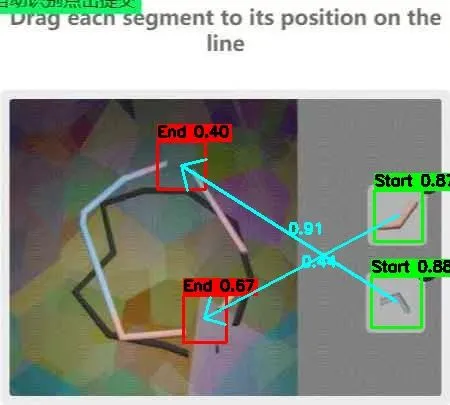
If you have protocol data (piece images, piece coordinates and the background) instead of a screenshot, paste the pieces onto the background at their coordinates to make an image that looks like the screenshot, then send it.
Animated questions
Section titled “Animated questions”For animated challenge images, send the animation (GIF or similar) Base64-encoded in queries. An animation of at least 3 seconds, ideally 5 to 6, at about 12 FPS works best.
Reports and refunds
Section titled “Reports and refunds”If the site rejects your clicks, report the tasks with report within 1 hour; refunds are settled after about 24 hours. Rules: Billing and refunds.